
Practical AI Implementation
Use AI where it helps. Build it so it holds up.
Ads keep promising that AI will transform your business, and most of them promise far more than the tools deliver. I look at how your work actually flows, decide which steps need AI and which are better as a plain script, and build the workflows, such as lead intake, follow-up and customer updates, with a person checking anything that reaches a customer.
Sound familiar?
- Leads arrive by email, your website and phone, and some wait too long or get missed.
- Customers keep asking where their project stands, and updating them by hand eats your day.
- You paste numbers or lists into AI to add them up or look things up, and have to double-check the answer.
- You use AI every day but retype the same prompts, and the good ones live in one person’s head.
- You’ve been pitched “AI agents” and can’t tell what’s real, what it costs, or what could go wrong.
- Employees are already using it, and nobody has set any rules.
- You’re not sure where AI would help your business, or how to start.
- You’d like AI working in your business but don’t have the time to learn it or set it up yourself.
What you get
- A Workflow Checkup with an AI focus: a step-by-step review of how a process runs today
- A written report that says, for each step, whether it should use AI, a script or automation, or stay manual, and why
- An honest range of time saved for each, based on your own tasks
- Clear rules for what information should never go into AI tools
- Then, for the steps you choose, a build quoted from the plan: workflows such as lead intake and sorting, follow-up reminders, notifications and customer status updates
- Scripts and automation for the exact jobs (routing, totals, lookups, record updates), so the result is the same every time, with no drift and no AI cost
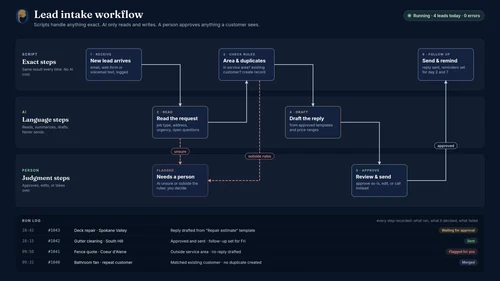
- AI only for the language and judgment steps, such as reading a message, summarizing it or drafting a reply, with a person approving anything that goes to a customer
- Logging and checks, so you can see what ran, what it decided and what failed
- A before-and-after check on time spent, so you can see what it really saves
- Templates, a one-page usage guide and a hand-off walkthrough, written for your business
// how it works
How it works
- 01
Listen
A free call to understand your business and what you want from AI.
- 02
Evaluate
The Workflow Checkup, AI focus: a written report on what uses AI, what uses a script and what stays manual.
- 03
Build
Set up the workflows you choose, with logging, checks and a person approving customer-facing messages.
- 04
Hand off
A walkthrough for your team and support as you put it to use.
AI is a tool that makes mistakes. I use it for language and judgment, scripts for anything exact, and a person checks what reaches your customers.
Questions
How is this different from automation?
Automation connects your tools so data moves on its own. This service starts one step earlier: it decides which steps in a process need AI at all, and builds the ones that do, usually combined with automation. If every step in your process is exact and rule-based, you may only need the Automation service, and I’ll tell you.
What does a workflow like lead intake actually do?
For example, an inquiry arrives by form or email, a script logs it and notifies you, AI summarizes it and drafts a reply, you approve it, and the customer gets status updates as the project moves along. The exact steps depend on your business. The checkup plan lays them out, and you decide which to build.
Will AI send messages to my customers on its own?
Not unless you want it to, and I usually advise against it at first. I set it up so a person approves anything customer-facing until it has earned your trust, and so you can see what was sent. Texting and calling customers also come with consent rules. I’ll point out where they may apply, and a lawyer can confirm.
I don’t know much about AI. Is that a problem?
No. Most people running a business or a department don’t, and don’t have the time to learn it on top of their job. I explain what each piece does in plain language, handle the setup, and leave you with a one-page guide and a walkthrough, so you can use it and check its work without becoming an expert.
Why not just use AI for everything?
AI is good at language and judgment, but it can drift on exact work like adding up invoices or looking up a price. For jobs like that, I build a small script or form that gives the same answer every time, runs instantly, and costs nothing per use.
Do you recommend a particular AI tool?
I recommend what fits your work and budget, which is sometimes a tool you already pay for. Tools change quickly, so I build the checks and habits around the work, not around one product.
Is it safe to put our business information into AI tools?
Not all of it. A big part of the setup is defining what should never be pasted in, and which settings and plans protect your data. I’m not a lawyer, so for legal or regulatory questions I’ll tell you when to ask one.
How much will we save?
It depends on the work, so I give honest ranges from your own tasks, not promises. In my own business, AI-assisted quoting cut quoting hours by roughly 30–40%, and I verify everything it produces.
Will AI replace my staff?
That isn’t the goal and not what I recommend. The aim is to remove busywork so people can spend time on the work that needs them.
Can you work with my whole team?
Yes. Every setup includes a hand-off walkthrough, and I can run a longer team session on request, in person around Spokane or remotely. I’m open to discussing travel to a customer in certain cases.
Not sure where to start? Book a free 30-minute call.
Bring one frustrating process, recurring software expense or broken system. We'll talk through what's happening, what you've tried, and whether I can help. If there's a fit, I'll explain the best next step.
Spokane, WA