
Workflow Checkup · Start here
Find out what’s actually slowing you down.
You know something is inefficient. You just don’t know what to fix first. The Workflow Checkup gives you a short written report, ranked by priority, so you can decide with real numbers in front of you. Most projects start here, and you pick the focus: a workflow, software costs, where AI fits, or the numbers you wish you could see.
Is this you?
- You know work takes longer than it should, but not where the time goes.
- You pay for software you barely use, or use three tools where one would do.
- Every fix you have heard about sounds expensive and vague.
- You want a plan you can hand to anyone, not a pitch for a big project.
Choose your focus
During the working session, we evaluate the focus you pick. You then get a written report with the suggested fixes, ranked by priority.
A workflow
One process from start to finish, such as lead to invoice. Where the time goes, and the fixes worth making first.
Software costs
Every subscription, what it’s for, what overlaps and what to drop, with the monthly saving for each.
Where AI fits
Step by step, which parts of a process should use AI, which should be a plain script, and which should stay manual.
Reporting
The numbers you wish you could see, where each one lives today, and what it would take to put them on one screen.
What you get
- A 60–90 minute working session, remote or in person near Spokane (travel to a customer can be discussed in certain cases)
- A discussion of the process from start to finish
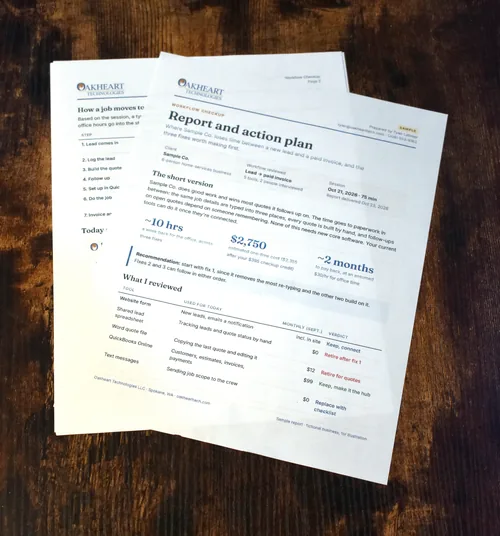
- A written report with the suggested fixes, ranked by priority
- For each fix: an estimated cost and the time it should save
- The checkup fee credited toward any follow-on project with me
- Scope: one workflow and up to about five tools or systems. A review across a whole company is quoted separately.
 SAMPLE
Workflow Checkup
Written report and action plan
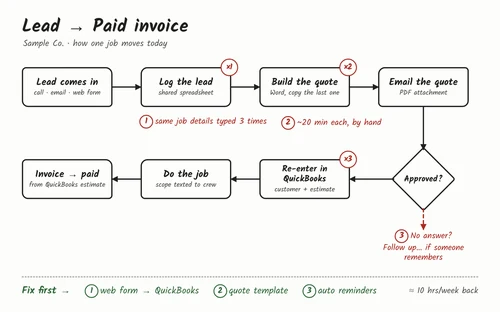
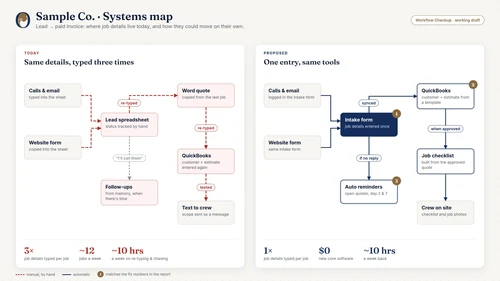
Sample Co., a 6-person service business · Workflow reviewed: lead to paid invoice
Prioritized fixes
| # | What's costing you | The fix | Effort | Est. cost | Time saved |
|---|---|---|---|---|---|
| 1 | Job details typed into three tools | Connect the intake form to accounting | Medium | $1,800 | ~5 hrs / week |
| 2 | Quotes built by hand in Word | Quote template that fills itself in | Small | $600 | ~3 hrs / week |
| 3 | Follow-ups tracked from memory | Reminders on every open lead | Small | $350 | ~2 hrs / week |
// how it works
How it works
- 01
Book
Pick a time for a free 30-minute call, and we’ll set up the checkup from there.
- 02
Intake
A short form about your tools and what’s slowing you down.
- 03
Session
We discuss the process from start to finish. You show me; I ask questions.
- 04
Report
You get the written report within a week of the session.
Questions
What if you find nothing worth fixing?
Then I’ll say so, and there’s no charge. If the best fix is something small, like a setting in software you already own, the report will tell you that.
Do I have to hire you afterward?
No. The report is yours. You can use it with me, with another developer, or on your own.
What do I need to prepare?
Nothing beyond the intake form. It helps to have a few examples handy, like a recent quote, invoice or schedule.
Do you need access to my systems?
Usually not. We sit down together and you show me how things work. If you’d rather I go in and evaluate them myself, you’d set me up with my own employee-level account. I only access what’s needed, I stay out of regulated data unless the work requires it, and I keep my own logins secure and use two-factor authentication. I don’t store your passwords unless it’s absolutely necessary.
Not sure where to start? Book a free 30-minute call.
Bring one frustrating process, recurring software expense or broken system. We'll talk through what's happening, what you've tried, and whether I can help. If there's a fit, I'll explain the best next step.
Spokane, WA